
1、 sudo !!
以root的身份执行上一条命令 。
场景举例:比如Ubuntu里用apt-get安装软件包的时候是需要root身份的,我们经常会忘记在apt-get前加sudo。每次不得不加上sudo再重新键入这行命令,这时可以很方便的用sudo !!完事。
1、 sudo !!
以root的身份执行上一条命令 。
场景举例:比如Ubuntu里用apt-get安装软件包的时候是需要root身份的,我们经常会忘记在apt-get前加sudo。每次不得不加上sudo再重新键入这行命令,这时可以很方便的用sudo !!完事。
| 技术 | 说明 | 官网 |
|---|---|---|
| Vue | 前端框架 | https://vuejs.org/ |
| Vue-router | 路由框架 | https://router.vuejs.org/ |
| Vuex | 全局状态管理框架 | https://vuex.vuejs.org/ |
| Element | 前端UI框架 | https://element.eleme.io |
| Axios | 前端HTTP框架 | https://github.com/axios/axios |
| v-charts | 基于Echarts的图表框架 | https://v-charts.js.org/ |
| Js-cookie | cookie管理工具 | https://github.com/js-cookie/js-cookie |
| nprogress | 进度条控件 | https://github.com/rstacruz/nprogress |
| 工具 | 说明 | 官网 |
|---|---|---|
| IDEA | 开发IDE | https://www.jetbrains.com/idea/download |
| RedisDesktop | redis客户端连接工具 | https://redisdesktop.com/download |
| Robomongo | mongo客户端连接工具 | https://robomongo.org/download |
| SwitchHosts | 本地host管理 | https://oldj.github.io/SwitchHosts/ |
| X-shell | Linux远程连接工具 | http://www.netsarang.com/download/software.html |
| Navicat | 数据库连接工具 | http://www.formysql.com/xiazai.html |
| PowerDesigner | 数据库设计工具 | http://powerdesigner.de/ |
| Axure | 原型设计工具 | https://www.axure.com/ |
| MindMaster | 思维导图设计工具 | http://www.edrawsoft.cn/mindmaster |
| ScreenToGif | gif录制工具 | https://www.screentogif.com/ |
| ProcessOn | 流程图绘制工具 | https://www.processon.com/ |
| PicPick | 图片处理工具 | https://picpick.app/zh/ |
| Snipaste | 屏幕截图工具 | https://www.snipaste.com/ |
| Postman | API接口调试工具 | https://www.postman.com/ |
| Typora | Markdown编辑器 | https://typora.io/ |
| 工具 | 版本号 | 下载 |
|---|---|---|
| JDK | 1.8 | https://www.oracle.com/technetwork/java/javase/downloads/jdk8-downloads-2133151.html |
| Mysql | 5.7 | https://www.mysql.com/ |
| Redis | 3.2 | https://redis.io/download |
| Elasticsearch | 6.2.2 | https://www.elastic.co/downloads |
| MongoDb | 3.2 | https://www.mongodb.com/download-center |
| RabbitMq | 3.7.14 | http://www.rabbitmq.com/download.html |
| Nginx | 1.10 | http://nginx.org/en/download.html |
项目地址:https://github.com/tensorflow/tfjs-models
首先将项目clone下来
1 | git clone https://github.com/tensorflow/tfjs-models.git |
1 | cd ~ |
1 | export PATH=/home/buildbot/source/staging_dir/host/bin:$PATH |
1 | mkdir -p mypackages/examples/helloworld |
1 | cd home/buildbot/mypackages/examples/helloworld |
自接触计算机,最早是从“王旁青头兼五一”…王码五笔(86版),到后来的极点五笔。然后,因为Win8的发布,Metro天生对五笔支持不好。加上全拼也越来越盛行,最后终于下定决心,来到了Win8字带的全拼输入法。再后来,IBM放弃了ThinkPAD,又痛苦的放弃了小红点,转到了MAC阵营。于是QQ输入法,搜狗输入法,一开始感觉挺方便,但随着隐私的越来越重好。最后,还是卸载了所有第三方输入法,转回到原生自带的输入法。之前一直用的
Tab键选项列表变成了声调切换,哪么选项列表如何展开呢?于是有了下面的文字记录。
其实macOS「版本:macOS Catalina 10.15.2」原生输入法很强大,简单介绍一些功能:
1.如果输入拼音后目标没在当前行,按右中括号键]可以跳到下一行同时展开候选项列表,按左中括号键[可以跳到上一行。
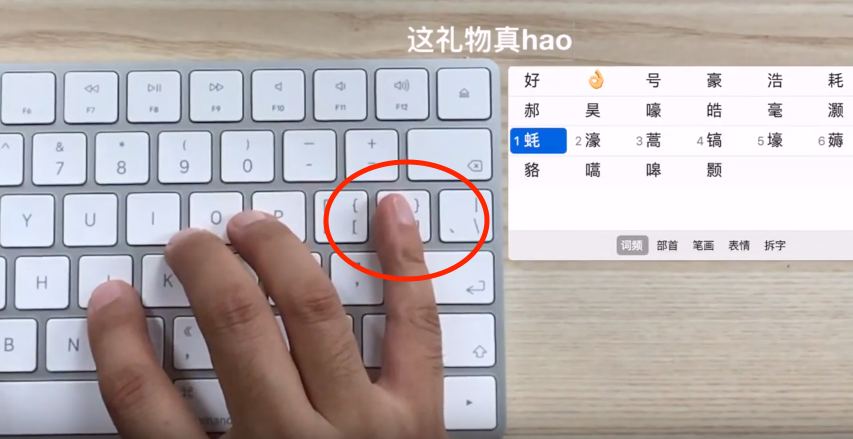
2.如果输入拼音后候选项太多,也可以按Tab键改变音调,从而筛选目标。

Github Actions 是 GitHub 推出的持续集成 (Continuous integration,简称 CI) 服务,它提供了配置非常不错的虚拟服务器环境(E5 2vCPU/7G RAM),基于它可以进行构建、测试、打包、部署项目。这篇文章就是介绍如何使用P3TERX 项目(workflow文件),进行云编译 OpenWrt固件。该方法免费,快速,无需消耗自己的计算机资源,每次编译都是全新环境。